As we’ve started a new quarter, I want to talk about budget pacing. Budgets are one of those things that when you think something might have gone slightly wrong, you have that horrible swooping feeling like your belly fell out and you’re going to fall over because of the horror of it all.
There are few things worse than overspending on a PO/allocated budget out of sheer human error. It’s a complete pain for the client / finance team and not a nice thing to have to own up to.
I’ve got 3 budget types to discuss to help limit how much damage you can do which will hopefully help to give you peace of mind.
Budget Type 1: Campaign Budgets
Everyone is aware of these – these are the daily budgets you set for each campaign. Sometimes when an account is under spending, advertisers will be tempted to whack the budget up and set the ads to accelerated delivery in an effort to get things moving.
The problem is that these two actions compound the effect, so you may be a bit shocked at how much those campaigns will actually spend after making those changes. If you’ve got under spending campaigns, divide the budget you have remaining by the remaining days of the month / allocated budget duration and set this as your daily budget. This means you’re increasing your budget but only within your means.
Budget Type 2: Shared Budgets
I LOVE shared budgets. This feature allows you to set a daily budget that you can apply to multiple campaigns. For example, you can create a ‘Brand’ budget and apply this to 5 brand campaigns. if the shared budget is set to £500, the campaigns the budget is applied to will only be able to collectively spend £500. This means you don’t have to rob from one campaign to give to another based on performance, as the budget will be available for whichever campaign needs it. On the flip side, be aware that if you have one high cost campaign within the shared budget campaign group, this will likely munch away more than its fair share of budget. It’s worth segregating money-hungry campaigns with their own budgets.
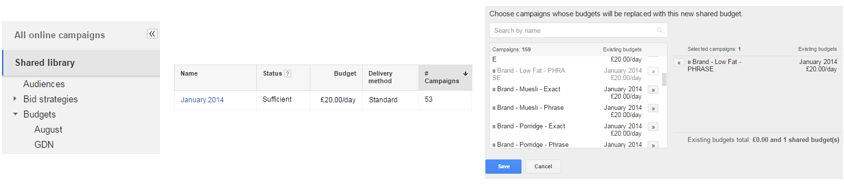
Budget Type 3: Budget Orders
This is pretty much the holy grail of budget limitations. Budget orders allow you to set an account wide budget for a set period of time. This budget order overrides any other budgets you have. For example, if you have a £500 budget per day at campaign level but only have a budget order for £1000 per month, your ads will stop running once you have hit your £1000 threshold.
Budget orders can be found under the ‘Billing’ section of your account and then under ‘Orders’. Here, you can set your budget limit and the period of time this corresponds to; the interface will update throughout the budget duration with how much of the budget has been spent.
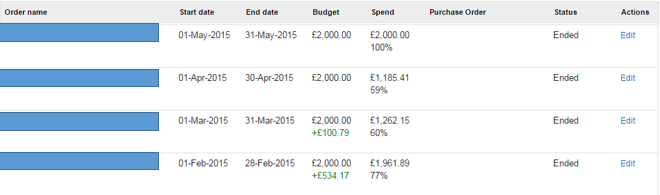
I use a combination of all three of these methods to avoid overspend and also ensure campaigns have the correct amount of budget allocated. If you don’t have them already, set up a budget order today and see how simple it is.
Do you have another method to stay on top of your budgets? Share it with the class and comment below.

